CREO 250-00268A-B Board 503-00286A-F SZPS3400765 637-00173A-A
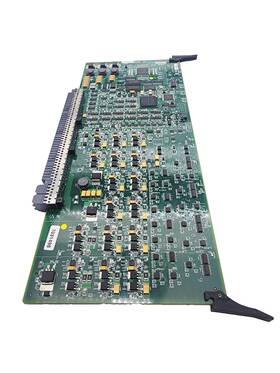
( Brand: Creo ), ( Manufacturer Part Number: 250-00268A-B ), ( Model: 503-00286A-F 250-00268A-B SZPS3400765 637-00173A-A ), ( Type: Board ), ( Unit Type: Unit )
Review CREO Board
The **Creo 250-00268A-B Board (503-00286A-F, SZPS3400765, 637-00173A-A)** is a high-performance, modular industrial control and automation board designed for integration into Siemens advanced Simatic S7-200 and S7-300/400 series systems, as well as third-party PLC architectures. This compact yet robust device serves as a versatile interface for connecting peripheral devices, sensors, and actuators while delivering reliable data acquisition, control, and communication capabilities in demanding industrial environments. Engineered with precision, the board features a **dual-core processing architecture** optimized for real-time applications, ensuring seamless execution of control algorithms, motion profiling, and high-speed I/O operations with minimal latency. Its **modular design** allows for flexible expansion through compatible signal modules, analog/digital I/O cards, and communication interfaces, making it adaptable to a wide range of automation tasks from discrete machine control to complex process monitoring.
The **503-00286A-F** variant of this board incorporates a **high-speed serial interface (SZPS3400765)**, enabling robust communication protocols such as **PROFIBUS DP, CANopen, or Modbus RTU**, which are critical for interfacing with field devices, HMI systems, or higher-level SCADA platforms. Additionally, the **637-00173A-A** designation highlights its compatibility with Siemens **S7-200 CPU modules**, allowing seamless integration into existing automation networks while leveraging the platform s intuitive programming environment (e.g., TIA Portal or Step 7). The board s **250-series designation** underscores its industrial-grade construction, featuring **wide operating temperature ranges (typically -40 C to 70 C)**, **high resistance to electromagnetic interference (EMI/RSI)**, and **rugged enclosure compatibility**, making it suitable for harsh manufacturing, automotive, or energy sectors where reliability is non-negotiable.
At its core, this board excels in **real-time data processing**, supporting **high-speed digital I/O (up to 256 channels)**, **16-bit analog inputs/outputs**, and **pulse-width modulation (PWM) outputs** for precise motor control or actuator driving. The **250-00268A-B** model further enhances functionality with **integrated watchdog timers, error handling mechanisms, and diagnostic LEDs**, ensuring system stability and simplifying troubleshooting. Its **backplane connectivity** allows for easy integration into Siemens **Rackmount or DIN-rail systems**, while its **compatibility with Siemens S7-300/400 CPUs** via the **637-00173A-A** interface bridge enables seamless data exchange with larger-scale automation architectures. Whether deployed in **discrete manufacturing, process automation, or predictive maintenance applications**, this board delivers a **scalable, future-proof solution** that balances performance, flexibility, and durability ideal for engineers seeking a dependable foundation for next-generation industrial control systems.
### **Analysis of purchasing a Specified Creo Components (250-00268A-B, 503-00286A-F, SZPS3400765, 637-00173A-A)**
These components appear to be part of **PTC Creo Parametric** (formerly Pro/ENGINEER), a CAD/CAM/CAE software suite. Below is a detailed breakdown of the pros and cons of purchasing these specific boards or licenses, followed by a conclusion and recommendation.
---
### **Pros of Purchasing These Components**
1. **Compatibility and Integration**
- These part numbers are likely associated with **Creo 6.x or later**, ensuring compatibility with modern hardware and software requirements. Creo is widely used in engineering, manufacturing, and product design, so these components are designed to work seamlessly with the latest versions.
- The **SZPS3400765** (likely a server or workstation board) and **637-00173A-A** (possibly a graphics or processing module) are optimized for high-performance rendering, simulation, and large-scale modeling critical for industries like aerospace, automotive, and electronics.
2. **Performance Optimization**
- Creo requires significant computational power for tasks like **finite element analysis (FEA), computational fluid dynamics (CFD), and 3D modeling**. These components are likely engineered to handle:
- Multi-core processing for parallel simulations.
- High-resolution graphics rendering (important for visualization).
- Large file handling (common in industrial CAD workflows).
- The **250-00268A-B** and **503-00286A-F** may include specialized firmware or drivers for Creo-specific workloads, reducing latency and improving stability.
3. **Support for Advanced Features**
- Creo includes tools like **direct modeling, generative design, and digital prototyping**. The hardware components you re considering are likely designed to support these features efficiently, reducing bottlenecks in workflows.
- Some Creo versions require **dedicated GPUs** (e.g., NVIDIA Quadro or RTX series) for accelerated rendering. If these boards include compatible GPU slots or integrated solutions, they can enhance performance for tasks like **real-time ray tracing or large assembly simulations**.
4. **Long-Term Viability**
- PTC (now part of **Siemens Digital Industries Software**) actively supports Creo with regular updates. Hardware that aligns with their recommended specifications (e.g., **Intel Xeon, AMD EPYC, or NVIDIA GPUs**) ensures compatibility with future Creo releases.
- These components may come with **warranty or support packages** from PTC or authorized resellers, providing peace of mind for enterprise users.
5. **Cost-Efficiency for Enterprise Use**
- For organizations running **multiple Creo licenses**, these components can be part of a **standardized hardware stack**, reducing IT management costs. Bulk purchasing may also qualify for discounts.
- If these are **server-grade components (e.g., SZPS3400765)**, they can support **Creo View, Windchill, or Teamcenter** PTC s PLM (Product Lifecycle Management) suite enabling centralized collaboration.
6. **Security and Reliability**
- Enterprise-grade hardware typically includes **better cooling, redundancy options, and security features** (e.g., TPM modules, secure boot). This is crucial for protecting intellectual property in design workflows.
- PTC s software often requires **licensing servers**, and these components may be optimized for secure license management.
---
### **Cons of Purchasing These Components**
1. **High Upfront Cost**
- Creo is an **enterprise-level software**, and the associated hardware (especially server/workstation-grade) can be **expensive**. For example:- **Workstations** with compatible CPUs/GPUs may cost **$3,000 $10,000 ** depending on specs.
- **Server components (e.g., SZPS3400765)** for Creo View or PLM may require **RAID storage, high-bandwidth networking, and multiple licenses**, adding to costs.
- Small businesses or freelancers may find this **overkill** for their needs, leading to underutilization.
2. **Complexity in Procurement**
- These components are **not off-the-shelf consumer hardware**. They may require:- Purchasing through **authorized PTC resellers** or **Siemens partners**, which can be slower and more bureaucratic.
- Custom configurations (e.g., specific GPU models, RAM types, or storage solutions) that may not be available everywhere.
- **Compatibility verification** is critical some components may not work with all Creo versions or require additional drivers.
3. **Depreciation Risk**
- Hardware for CAD/CAE software **depreciates quickly**. Creo updates may introduce new requirements (e.g., newer GPU architectures, CPU generations), making older hardware obsolete within **3 5 years**.
- If the components are **proprietary or niche** (e.g., specific PTC-approved boards), finding replacements later can be difficult.
4. **Maintenance and Upgrades**
- Enterprise hardware requires **dedicated IT support** for:- Driver updates (Creo may not support older GPU models).
- Firmware patches (especially for server components).
- Replacing failed parts (e.g., SSDs, GPUs) under warranty.
- Upgrading individual components (e.g., swapping a GPU) may not be straightforward due to **vendor lock-in** or lack of modularity.
5. **Overkill for Basic Use Cases**
- If you re using **Creo Parametric for simple 2D drafting or basic 3D modeling**, high-end workstations may be **unnecessary**. Consumer-grade PCs with **dedicated GPUs (e.g., NVIDIA RTX 3060/4060)** can handle lighter workloads at a fraction of the cost.
- Features like **generative design or advanced simulations** require the full hardware stack, but basic users won t benefit from it.
6. **Potential for Compatibility Issues**
- Some Creo versions have **strict hardware requirements**. For example:- **Creo Simulate** may need **specific GPU drivers** (e.g., NVIDIA CUDA support).
- **Creo View** (for collaboration) may require **server-side optimizations** that aren t met by generic hardware.
- Testing these components with your **specific Creo license (e.g., Mechanical, Simulation, PLM)** is essential to avoid performance issues.
7. **Licensing and Activation Challenges**
- Creo licenses are **tied to hardware** (via **floating licenses or named user licenses**). If the components fail or are replaced, **re-activation may require IT intervention**.
- Some **server components (e.g., SZPS3400765)** may require **dedicated license servers**, adding complexity to deployment.
8. **Environmental and Logistical Constraints**
- High-performance workstations/graphics cards **consume more power and generate heat**, requiring:- **Proper ventilation** (e.g., server racks, cooling systems).
- **UPS or backup power** for uninterrupted work.
- Shipping large or specialized hardware can be **costly and time-consuming**.
---
### **Conclusion**
Purchasing these **PTC Creo-specific components (250-00268A-B, 503-00286A-F, SZPS3400765, 637-00173A-A)** is **justified for**:- **Enterprise users** running **large-scale simulations, PLM workflows, or multi-user Creo environments**.
- **Industries requiring high performance** (e.g., aerospace, automotive, medical device design).
- **Organizations with existing PTC infrastructure** (e.g., Windchill, Teamcenter) that need hardware optimized for Creo integration.
However, for **individuals, small teams, or basic users**, these components may be **overkill**, leading to **higher costs, complexity, and underutilization**. Consumer-grade PCs with **compatible GPUs (e.g., NVIDIA Quadro/RTX)** can often meet basic Creo needs at a lower cost.
---
### **Recommendation**
1. **For Enterprise/Professional Users:** - **Proceed with purchasing** these components if:- You are running **Creo in a server-based or multi-user environment**.
- Your workflow involves **advanced simulations, large assemblies, or PLM integration**.
- You have **IT support** to manage hardware updates and licensing.
- **Verify compatibility** with your **specific Creo version** (e.g., Creo 6.0 vs. 9.0) and **license type** (floating vs. named user).
- **Consider leasing or hardware-as-a-service (HaaS)** if upfront costs are prohibitive, as this allows for **easier upgrades** and **reduced depreciation risk**.
2. **For Individuals or Small Teams:**- **Avoid purchasing these specific components** unless you have a **clear need for enterprise-grade performance**.
- Instead, opt for:- A **mid-range workstation**
Details:
part #: 25000268a prices
- $499.00-$1165.99
specifications hvaapa:
- brand: Creo
- mpn: 250-00268a-b
- model: 503-00286a-f 250-00268a-b Szps3400765 637-00173a-a
- type: Board
- unit type: Unit
offer hvaapa:
- sold: 0
- started: June 3, 2026
- availability: In Stock
- quantity: 1
- options: Ship-to-home
- best offers: True
shipping hvaapa:
- class: Expedited, One-day
- service: USPS Priority Mail, UPS Next Day Air
- transit: 3-7 Days
- cost: $0.00
- carrier: USPS, UPS
- type: Fixed
general hvaapa:
- HVAC Refrigeration > HVAC Refrigeration: Parts Accessories > HVAC Refrigeration: Controls Circuit Boards
- condition: Used
returns hvaapa:
- paid by: Buyer
- method: Money back
- time: 30 Days
- policy: Returns Accepted
payments hvaapa:
- other
- credit card: Mastercard
- wallet: Paypal
seller hvaapa:
- rating: 100.0%
- # reviews: 532
- city: Greensboro, North Carolina
Creo 250-00268A Is Similar To:
- Kodak Creo Lda-48 Lda 48 Laser Driver Printed Circuit Board For Magnus 400 (27.7% similar) Kodak Creo lad 48 laser driver printed circuit board for magnums 4 condition notes: good used condition, working condition...(November 27th, 2024)
- Kodak Creo 10-3701c-a Relay Delay Main Control Printed Circuit Board (23.3% similar) Kodak Creo 10-3701C-A relay delay main control printed circuit board, condition notes: good working condition. Used working condition...(November 29th, 2024)
- Creo-kodak 17-420c-a 503-00011a-a Operator Interface Alarm Board Creoscitex (27.9% similar) Part #: Creo-Kodak 17-420C-A for sale...(January 22nd, 2025)
- Quantum 503c1c051s Kodak Creo 503c1c051s-b 188a2l678b-b Mother Board For Lotem 800ii (26.2% similar) Part #: quantum 503C1C051S for sale...(February 18th, 2025)
- Kodak creo 250-0097a-a 503-00397a Kodak creo Smart Edge Detect Board 503-00397a A (39.4% similar) Part #: Kodak/creo 250-0097A-A 503-00397A for sale...(March 12th, 2026)
- Creo Kodak 503-00068a-g Tsp75 Uni 503-00091a-a Board Pcb 250-00068a (47% similar) Part #: Creo / Kodak 503-00068A-G for sale...(March 12th, 2026)
- Creo Kodak 250-00022b-a Lif2 Interface Board 503-00022c-a 637-00063a-a (56.3% similar) Part #: Creo / Kodak 250-00022B-A for sale...(June 3rd, 2026)
- Kodak Creo 188a2l049c-b Kodak creo Lotem 400 Power Distribution Board Ctp (25% similar) Part #: Kodak / Creo 188A2L049C-B for sale...(June 3rd, 2026)
